HTML2TSCN
Design your Godot UI in HTML and CSS, then convert it into a real .tscn scene. Actual Control, VBoxContainer, PanelContainer and Button nodes with proper anchors and StyleBoxFlat styling - not a webview, and nothing to do with HTML5 export.
Overview
Anchors, containers, size flags, StyleBoxes, hover states - building a settings screen or a HUD by hand in Godot is an afternoon of clicking. If you already think in HTML and CSS, you can lay the same screen out in minutes and convert it.
What comes out is a scene you could have built yourself. Open the .tscn in the editor and it is ordinary Godot: named nodes, real anchors, StyleBoxFlat styling, theme state slots on buttons. Nothing from the plugin ships in your game - it is an editor tool that writes a scene and then gets out of the way.
To be clear about what this is not: it has nothing to do with exporting a Godot game to the web. No webview, no overlay, no HTML5 export. HTML is the authoring format; the output is native nodes.
Key Features
Re-converting Is Safe
The generated scene lives in its own file, instanced into a scene that belongs to you. Your scripts, extra nodes and tweaks stay untouched when you regenerate - and if a change to the HTML would orphan an edit, the report says so before you open the scene.
Real Control Nodes
Block, flex and CSS grid; absolute and fixed positioning with full anchor solving; scroll regions; justify-content, align-items, flex-grow, gap; margins with real block-flow collapsing.
Holds Up at Every Resolution
Layout is verified at nine real resolutions, from 480×900 to 3840×1080. Real resolutions rather than widths, because ultrawide is a wider problem and not a scaled-up one - passing at 1920×1080 proves nothing about 3440×1440.
It Tells You What It Couldn’t Do
Every conversion writes a report listing anything dropped or approximated, with the source line and the generated node path. Click a warning in the dock and it selects that node in your scene.
States Become Theme Slots
:hover, :active, :focus and :disabled become real Godot theme state slots on buttons, so the interaction feel survives the trip.
Component Extraction
A card repeated ten times becomes one scene instanced ten times, so you edit it once instead of ten.
Script Scaffolding
Tick a box and get a .gd with an @onready for every named element and widget, and a stub handler for each signal. Created once and never overwritten.
Inline SVG Icons
The <svg> glyphs in your markup are written out as real .svg files and shown as textures, so a HUD keeps its icons.
Auto-Convert on Save
Edit your HTML or CSS and the scene updates. Change the styling, keep working.
Typography Stays Yours
The converter never writes fonts into your scene. It reports what the design asked for and lets your own Theme apply on top.
The Page and the Scene
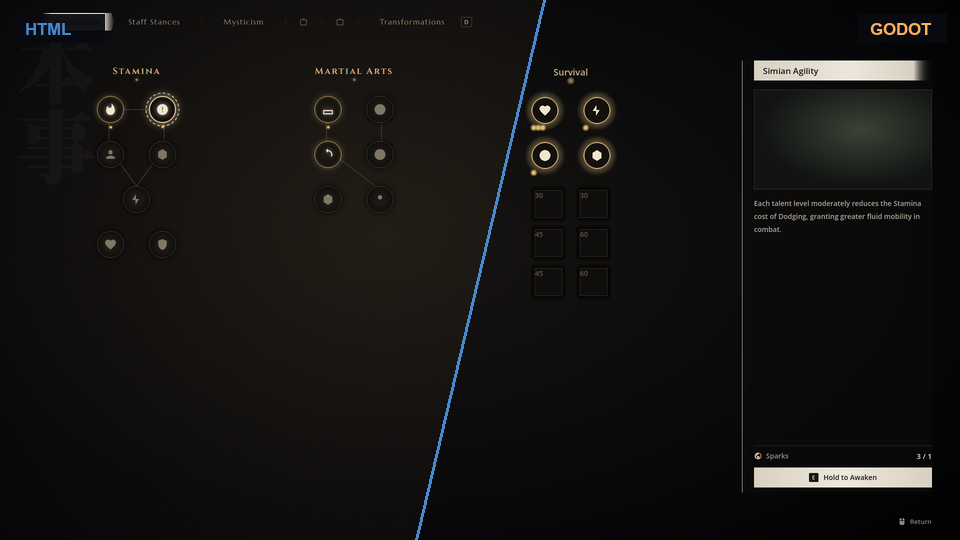
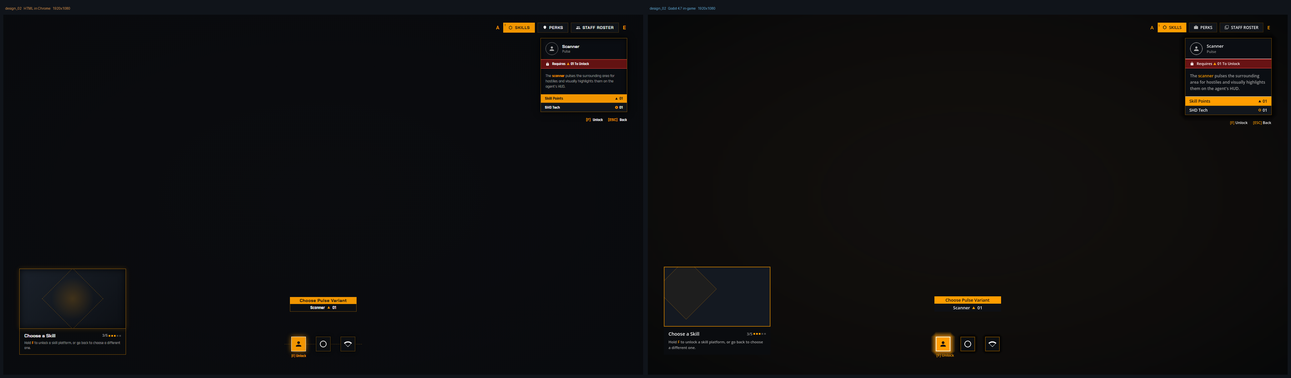
Browser on the left, the converted Godot scene on the right, both at 1920×1080. These are the project’s own fidelity renders - the same pairs the test harness produces on every run.
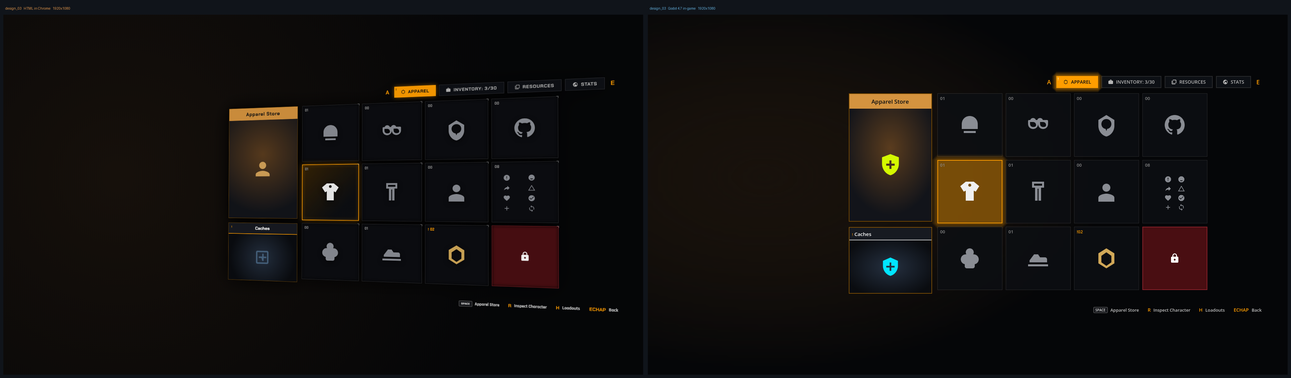
Inventory grid - CSS grid, icon tiles, selection states.
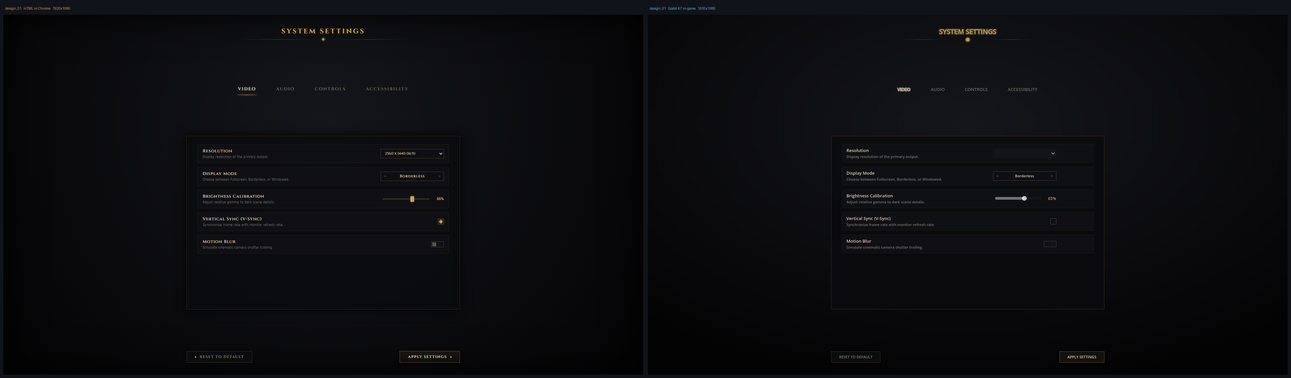
Settings screen - tabs, rows, sliders and dropdowns.
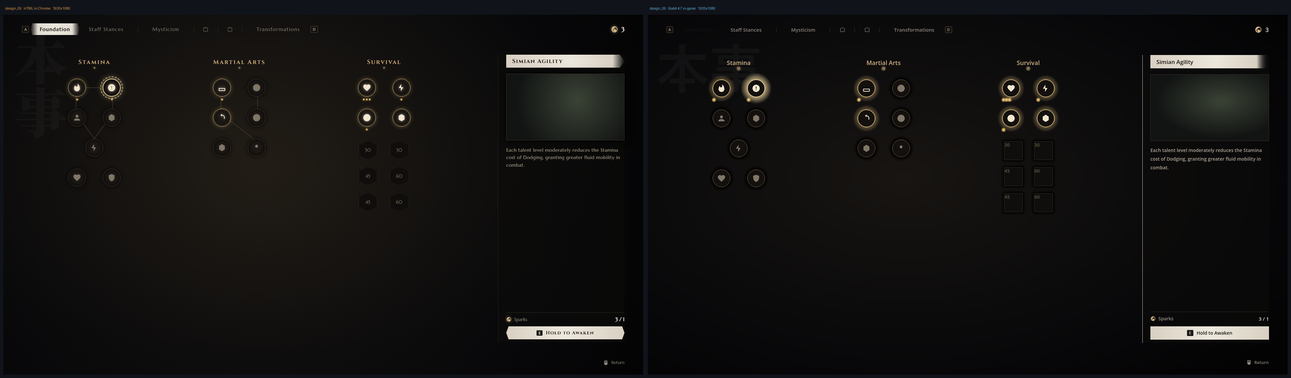
Skill tree - absolute positioning, glow states, a detail panel.
Mission board - nested panels, a scroll region, tab bar.
What Converts
Layout. Block, flex and CSS grid; position: absolute / fixed with full anchor solving; scroll regions; max-width with margin: 0 auto; flex-grow, flex-shrink, gap; margins with real block-flow collapsing; box-sizing; fixed grid tracks.
Styling. Backgrounds, borders, corner radius, shadows, padding, opacity, linear and radial gradients, background images, z-index, cursors.
Content and widgets. Headings and paragraphs; inline <b>, <i> and <a> as BBCode; lists, tables, images, inline SVG, ::before and ::after; <button>, <input> (text, number, range, checkbox, colour), <textarea>, <select>, <progress>, and <details> as a FoldableContainer.
The CSS engine itself. Selectors with specificity, inheritance, custom properties with fallbacks, calc(), !important, and @media queries evaluated at your chosen design size.
And what does not. A few things Godot genuinely cannot express - a gradient underneath a border, an inset box-shadow, a clip-path silhouette - are reported rather than silently skipped. Expect around 90% of a design to come across and to tweak the rest. That is the honest number, and the report tells you exactly where to look.
Technical Details
Plugin Info
| Engine | Godot 4.7 or newer |
| Also needs | Python 3.10+ on PATH |
| Platforms | Windows, macOS, Linux |
| Ships in your game | Nothing - editor only |
| Category | Editor Plugin |
| Developer | SoulPersona |
| Price | Name your own price |
| Status | Released |
Tech Stack
Requirements
Python does the conversion; Godot draws the result. Standard library only - no pip install, no dependencies, just an interpreter on your PATH. The dock checks at startup and tells you if it cannot find one, rather than failing at Convert time.